Thursday, November 1, 2007

Thesis Hand In

Over the last two weeks, I have been finalising my treatise preparing it for official submission. Here is a summary regarding the statement of achievements of this treatise:

Individual Achievements:

At the individual level, this treatise has accomplished the following:

  • A prototype Workflow Builder enabling clinicians to define abstraction level workflows without prior technical knowledge and/or experience in programming.
  • Transformations of abstract level workflow into a WDL file adhering to an XML schema.
  • Demonstrated the generic qualities of the Workflow Builder such that its application is domain independent.
  • An evaluation of strengths and weaknesses of such a prototype with regards to the overall Workflow Management System and guidelines for a future implementation.

Joint Achievements:

Joint achievements are the result of synergistic benefits of working in a research group. These include the following:

  • A system analysis of the Intensive Care Unit at the Royal Prince Alfred Hospital, Camperdown, Sydney demonstrating the inadequacies of their information environment in delivering on time information and workflow support to staff.
  • A workflow analysis of the Intensive Care Unit at the Royal Prince Alfred Hospital, Camperdown, Sydney demonstrating how some of their processes have increased in complexity as a result of disparate and old information systems.
  • A partial ideal software requirements specification for an intensive care information system that is mainly focused around the care of patient.
  • Proof of concept Workflow Management System prototype demonstrating the ability to design form centric workflows that is independent of domain, that is, the workflow has been abstracted and decoupled from being hard coded into the system. This is to be implemented as part of a larger G.C.I.M.S project.


Saturday, October 13, 2007

Weekly update 12/10/2007

The past week has been relatively quiet on the thesis front as I have been working on assignments for my other subjects.

However, I have managed to solve the problem of generating unique ids for each workflow element. From here on, any changes to code will mainly involve commenting, clean up and testing.

Also, Hendy and I have submitted our joint poster to the Reasearch Conversazione which is held on the last day of the semester.

Research Conversazione 2007

I have just submitted our entry to the Research Conversazione 2007 which is to be held on the last day of the semester. Hopefully these entries will be able to highlight how current information systems in our health industry are inadequate and show the potential of what IT has to offer in this field. Here is what our poster looks like:

Friday, October 5, 2007

Workflow Builder


Below are screen shots of the workflow builder I have been working on. Its has a relatively simple layout true to the design goals I have set. The GUI essentially allows the users to build abstract workflows, save them to a file and save them to a Workflow Management database. It also allows the users to display and retrieve these workflows.


The workflow builder is still incomplete. There are revisions that need to be undertaken; these include:
  • Documentation of code - I need to find a way of generating an API (there are certain tools out there that I have yet to investigate).
  • Generation of unique IDs for each workflow element -
  • Testing, testing, testing ...
Quick Demonstration:

The screen shots below shows how user can create an abstract workflow.


The second screen shot shows the program generating the abstract workflow in XML before saving it to a file and storing a copy in the database.

Weekly Update 05/10/2007 - Thesis Consolidation

Today, Hendy and I resumed our weekly meeting with our surrogate supervisor, Alan Fekete. While Professor Jon Patrick is away, we have been in touch through email and online entries onto the TRAC.

During the meeting, I gave an update on my thesis progress. I have almost completed the foundations of the workflow builder. There are minor revisions and testing that needs to be done in order to make the workflow builder functional. I will provide the list of updates in a later entry. According to the agile process, I have completed the first four iterations and up to the fifth iteration.

Upon the outcomes of the meeting, Alan has advised us to finalise the core fundamentals of the thesis and begin the write up. This will involve revising the thesis draft (marks have yet to be released, however, our supervisors have given us feedback on them) , adding and correcting the draft and then documenting the second half of the semester. Roughly additions to the draft thesis will be:
  • Documentation of the software methodology/model used
  • Documentation of architecture
  • Documenting the results
  • Documenting possible extensions (future work)
  • Writing up a conclusion
It will take roughly 1-2 weeks (depending on the load of my other subjects) to write up these sections.

Thursday, September 27, 2007

Quick Update 28/09/2007

Just to provide a quick update on the progress of the thesis. The week coming to an end is the mid semester break so I have been working lightly on the design and implementation of the workflow builder as well as thinking conceptually on how the whole design will benefit the GCIMS architecture.

Workflow Builder
The workflow builder processing component, that is building an abstract of the workflow is approximatly 90% complete. Tests scripts can be used to build workflow elements of sequence, parallel split, simple merge and synchronisation and exclusive choice. Slight modifications (dependent on the finalisation of the WDL) and testing needs to be done on the workflow before I can finalise the processing part. I will finalise and present the results of each of the iterations once I have collated and analysed all my output.

Workflow GUI
I have begun researching and designing a simple workflow GUI. The GUI would be simple but allow users to essentially define their workflow and generate the XML output. I have decided not to do any "click and drag" and diagram based GUIs due to the time and scope of the project. Upon email consultation with Alan, he has advised me to focus my time on areas which will add value to the theoretical approach rather than focus on designing a flashy GUI with many 'bells and whistles'.
As a result, the simplified GUI would be designed to show the the core functionality of the workflow builder, that is, allowing users to create their workflow. The program and GUI is designed to be easy to read (i.e. code is well documented), understand (i.e. code is refactored and broken down) and be easily extendable assuming that future programmer has some experience in programming and OO design.

Meeting to Confirm Workflow Definition Language
On thursday the 27th of September, Hendy and I had a brief meeting to finalise the workflow definition language (WDL). We have made the following slight modifications:
  • Merge and Synchronisation workflow elements are the same but only differ in the fact that synchronisation must wait for all workflows to merge before moving onwards.
  • There is no longer a need to store the previous or next element. This is implicitly done by the structure of the XML
  • Each workflow element (Seq, merge, sync, exc choice, par split) must have an attribute name and unique id. The name corresponds to the workflow name (e.g. Set Up Bed, "Administer Medication"). Each element must have a form and and a corresponding attribute "name". This form name corresponds to the name of the form from the form database. In my prototype workflow builder, i have made the assumption that the forms are valid and exists. But in a fully functional and operational program, the builder will interface directly with the forms database to ensure that the form exists.
  • In merge and synchronisation work elements, there is no need to have form as an element. The reason is that the merge/synchornisation only acts as a medium in which workflow elements come together and feed into another workflow element.

Hendy and I have also discussed the overall architecture of the WfB and WfM in the WfMS. We have also discussed how we can each improve our own parts and how we can possibly demonstrate the idea. Currently, we are having issues integrating our parts into the GCIMS, especially the form builder. There are some font compatability issues in python going from a Mac to a PC environment which we have been trying to nail out. We may investigate the possibility of setting one of the uni computers to run all our applications if time permits.

Friday, September 21, 2007

Workflow Builder Design

  • The Workflow Builder provide users with the ability to define their own workflow. It is based on the idea of document centric workflow system.
  • Prototype is designed to be a simple workflow builder that would be used to build the basic definitions of workflow but allow extensions for more complexes multiple user based workflow. Supported workflow includes the following fundamentals

  1. Sequence - An activity in a workflow process is enabled after the completion of another activity in the same process. A sequence point in the workflow is represented by a square followed by an arrow pointing to the next workflow element.
  2. Parallel Split - A point in the workflow process where a single thread of control splits into multiple threads of control which can be executed in parallel, thus allowing activities to be executed simultaneously or in any order. A parallel split is represented by a single workflow element with two or more arrows pointing to other workflow elements.
  3. Synchronisation - A point in the workflow process where multiple parallel sub processes/activities converge into one single thread of control thus is synchronizing multiple threads. It is an assumption of this pattern that each incoming branch of a synchronizer is executed only once.
  4. Exclusive Choice - A point in the workflow process where, based on a decision or workflow control data, one of several branches is chosen.
  5. Simple Merge - A point in the workflow process where two or more alternative branches come together without synchronization. It is an assumption of this pattern that none of the alternative branches is ever executed in parallel.

Source: http://www.workflowpatterns.com/


Workflow Builder Requirements
  • The primary goal of the Workflow Builder is to allow Users to build basic workflows using a simple user interface. The abstract workflow defined by users is converted into XML and then stored in a database.
  • The XML is saved into a MySQL database.
  • The workflow builder should be able to open saved workflow documents but may not necessarily offer modifications in the prototype.
Workflow Builder Prototype Goals
  • Design a simple user interface to allow users to construct workflow in abstract form. Initially the user interface will be a DOS type interface. A GUI may be developed if there is time.
  • This abstract workflow is then converted to XML in accordance with the WDL schema and stored in a MySQL database.
  • Allow read-only retrieval of workflow to show demonstrate the reconstruction of XML into run time instance of the workflow.
  • At this stage, modifying workflow, fancy GUIs and other bells and whistles are currently out of scope. They may fall into scope if time permits.
Basic Design Architecture

  • Separate GUI from underlying programs. Therefore develop a class for the workflow and a class for the GUI which will be a command prompt at the moment. In this prototype a test class will replace the GUI. The GUI will be developed when there is time available. The main focus should be on the computation and creation of abstract workflow and conversion of this abstract into XML.
OO Design
  • Work Element – is the individual workflow element; an atomic activity of some sort that does work using resources of the company. A series of work elements linked together make up a workflow. For example, “Prepare Bed” is a work element which is part of the “Admission” workflow. They are usually represented as squares or rectangles on the workflow diagram. In the workflow definition language (WDL), every work element is a form. Its behaviour is distinguished by its attributes and the flow of work to the next work element is determined by a relationship variable.
  • Relationships – are the linkages between the work elements which make up the workflow. The linkages or “relationships” between the work elements
  • Workflow – is a series of work elements and their relationships. It is essentially a container of workflow elements and their relationships

Work Element is a hierarchy with differing types. These types define the type of work element it is and also determines the relationship attribute, i.e. the relationship attributes is what distinguishes the different type of work element. Otherwise work elements devoid of relationships is the most basic and atomic object.


Simplified UML Diagram

Note: Diagram needs to be updated.

Software Development Methodology

As the project is dividable into small iterations, I am going to adopt the Agile Approach to building the Workflow Builder. A brief summary of the methodology is given below:

Agile Approach

Take an agile approach where we use iterative process to develop the workflow builder.

First Iteration

The first iteration heavily revolves around generating ideas and initial design documents. Once that is completed, I envisage to begin programming and developing a small component of the workflow builder. The iteration is to achieve the following set of tasks:

  • Design and revise the design of the Workflow Builder rigorously and continue to refine the design at later stages of iterations.
  • Create MySQL database to store simple XML workflow documents
  • Create a set of sequence documents
  • Write up program to add sequences only.
  • Convert the sequence into XML and output to the database.
  • Test the individual creation of sequence modules.
  • Create a sample sequence XML document adhering to the WDL. Create this abstract workflow and compare the XML output from the builder with the XML document.
  • Document findings and experimentation on the TRAC and summaries on the blog.

To begin the first iteration, we must research into:

  • Python classes and objects
  • Python arrays and other data structures
  • Python and XML
  • Document findings and experimentation on the TRAC and summaries on the blog.


Second Iteration

The second iteration is mainly focused on extensibility of simple, yet fundamental workflow points. The goal is to achieve the following set of tasks:

  • Extend the sequence and implement Parallel Workflow Element.
  • Ensure that Parallel Workflow can be converted to the XML format as per WDL.
  • Perform testing on the module level (and if possible at the unit level)
  • Create a sample sequence and parallel workflow XML document adhering to the WDL. Create this abstract workflow using the Workflow Builder and compare the XML output from the builder with the XML document.
  • Document findings and experimentation on the TRAC and summaries on the blog.

Third Iteration

The third iteration targets the more complex workflow; namely simple merge, synchronisation and exclusive choice. Exclusive choice is perceived to be the most difficult due to the possibility of large amount of nesting. Hence, third iteration is heavily focused on:

  • Develop Simple Merge and Synchronisation Workflow Elements.
  • Ensure that the Simple Merge and Synchronisation Workflow Elements can be converted into XML on its own basis.
  • Perform testing on the module level (and if possible at the unit level)
  • Extend second iteration sample XML documents to include simple merge and then synchronisation. Ensure that the generated XML will adhere to the WDL.
  • Develop the Exclusive Choice Workflow Element.
  • Ensure that the workflow element can be converted into XML on its own basis, i.e. the most basic case.
  • Perform testing on the module level (and if possible at the unit level)
  • Extend second iteration sample XML documents to include exclusive choice. Ensure that the generated XML will adhere to the WDL. Continue extending the XML document to test the exclusive choice nesting with sequences, parallel, simple merge and synchronisation workflow elements. Examine the outputted XML
  • Document findings and experimentation on the TRAC and summaries on the blog.

Fourth Iteration

The fourth iteration’s main goal is to develop the workflow builder which will manage the creation of abstract workflow. It is envisaged that due to the lack of time, either a basic and simple GUI will be developed or a basic command prompt interface will be developed. The main tasks for the fourth iteration is:

  • Finalise the testing in the first to third iterations.
  • Ensure that the format of the XML adheres to the WDL and make any changes as necessary. There will definitely be changes as the WDL is a constantly evolving piece of work.
  • Develop a basic workflow builder interface design on paper.
  • Research on Python’s GUI packages.
  • Implement a basic design without any bells or whistle
  • Document findings and experimentation on the TRAC and summaries on the blog.

Resources required to successfully complete this iteration includes:

  • Research on basic GUI
  • Experimentation on user interface design


Fifth Iteration
Once the interface has been designed, the fifth iteration will be more involved with testing; ensuring that different types of workflows can be abstractly represented. It is vital that the XML generation is consistent and can be used as input into the Workflow Manager. Also, as experience is gained from this development, documentation of results and more importantly documentation of future development, future direction of this research and a critical analysis of the system be duly noted. This will form the foundation of future work.

Weekly Summary 21/09/2007

As noted in my previous entry, the WfMS is divided into the WfBuilder and WfManager. After lenghty discussions I have decided to build the WfBuilder. The language we will be using is python.


The last week has been spent on familiarising myself with python, helping out with the Workflow Definition Language, designing the workflow builder and beginning the first and second iteration (refer to later post on Software Development Methodology). I will post up the rough design and software methodology after this post.

As Alan Fekete is flying out this week, we had a very brief over the phone discussion of our project to date. As a result, I will need to email him a brief update on my progress.

Update: Workflow Diagram

The updated workflow diagram is shown below. We are still getting some feedback on the diagram.
But early feedbacks are positive.

Friday, September 14, 2007

RPA Site Visit

On Friday afternoon, Hendy and I made our way to the RPA for a meeting with Angela Ryan. We verified all workflow diagrams surrounding the care of the patients. Only minimal changes need to be made. These include:

  • Redefining "Doctor On Call"
  • Nurse workflow additions to admission, discharge and bed management.
  • Extra workflows regarding the requests for tests (e.g. x-rays and blood gas).
  • Routine workflows regarding nurses and doctors
Hendy and I will post the updated workflows once we have updated them.

Meeting with Alan Fekete on 14/09/2007

Hendy and I had our weekly meeting with Alan Fekete today to discuss what was achieved during the last week and what we can in the following week.

The Workflow Management System (WfMS)

The diagram above shows the basic architecture of the WfMS for the G.H.I.M.S project. Each part is described below:

XML Schema
The XML schema describes the rules for which workflow can be instantiated in XML. The Workflow Definition Language (WFD) has been completed.


Workflow Builder
  • The Workflow Builder provide users with the ability to define their own workflow. It is based on the idea of document centric workflow system.
  • Prototype should be a simple workflow builder used to build the basic definitions of workflow but allow extensions for more complex multiple user based workflow. Simple workflow includes sequence, parallel split, synchronisation, exclusive choice and simple merge.
  • Users would be able to build basic workflows using a simple user interface. Then when the user saves the workflow, it should generate an xml output which is stored in a MySQL database.
  • The workflow builder should be able to open saved workflow documents but may not necessarily offer modifications in the prototype.

The Workflow Builder Prototype Goals

  • Design a simple user interface (possible GUI based) to allow users to construct workflow in abstract form.
  • This abstract workflow is then converted to XML in accordance with the WDL schema and stored in a MySQL database.
  • Allow read-only retrieval of workflow to show demonstrate the reconstruction of XML

Workflow Manager

  • The workflow manager takes the abstract workflow and instantiates it. Its main responsibilities include
  • Routing the workflow by delivering appropriate forms to users, requesting users to fill out forms and presenting information when requested.
  • Able to notify users at which point of the workflow they’re in.
  • Able to deliver what needs to be done
  • The workflow manager would have to obtain workflow instances from the MySQL workflow database, instantiate it and execute the workflow. In order for this to work, workflow manager must reside in the G.H.I.M.S server and interface with the Form Builder database.

Workflow Manager Prototype Goals

  • Demonstrate the construction of workflow instance from XML instance.
  • Route the appropriate forms, documents, alerts etc. to the users

Upon discussion with supervisor and the team, I have decided to attempt to build a simple Workflow Builder while Hendy will attack the Workflow Manager.

Task for the following week
For the following week, I plan to do the following:
  • Rigorously plan the design of the workflow builder - what it should ideally do, how it should do it and what resources will be needed.
  • Scope down the requirements and implement a subsection of the workflow builder. By the end of this week I hope to have the workflow builder being able to basic sequences using command prompt.

Friday, September 7, 2007

Meeting with Alan Fekete - Project rescope

Today Hendy and I had a meeting with Alan Fekete and Peter Budd to report our findings for the previous week and discuss how we could divide up the treatise into two meaningful segments.

Investigation into the use of CareVue in G.H.I.M.S ICU

The following segment describes the findings describing whether the G.H.I.M.S ICU system will rely or use CareVue.

CareVue Database Environment

  • Data is recorded by CareVue and stored into two separate databases; real time database and an historical database. The difference in both databases is that the real time database records and displays live data for recent ICU patients whereas, the archival database stores data for all ICU patients.
  • The historical database is called the Information Support Mart (ISM); a clinical data management information support mart that interfaces with CDA to create a set of approximately 30 tables from 300 tables.
  • The real time database is called the Clinical Data Archive (CDA) contains over 300 tables


Extraction of Data from CareVue for the ICU G.H.I.M.S

  • Currently, there is code written (from another project called the Ward Round System) to extract data from the historical database. As a result, we envisage that investigation into extracting data from CareVue and inputting it into an ICU G.H.I.M.S would be trival.
  • While extracting data from CareVue would be achievable, inputting the data into the database is live or archival database is problematic because:
  • We will be manipulating
  • There is a resource constraint on the access of the database.
  • Furthermore, it is envisaged that the complete ICU G.H.I.M.S would serve as a replacement to the hospitals current information system setup. Instead, de-identified CareVue data could be used as a base for data requirements analysis (as per system analysis completed) and as sample data to enter into a prototyped ICU G.H.I.M.S.

Workflow in the ICU

  • CareVue currently does not support a workflow management system.
  • There are really no standardised forms that CareVue uses during throughout the workflow in the ICU. There are certain stages and activities (e.g. automated recording of vital signs, recording of nurse discharge summaries) where there are computerised forms which are later printed out. A significant portion of clinician notes a rerecorded in free text, however some entries follow standard template (such as the Ward Round Templates).
  • Some paper forms are used during certain ICU workflows. For example, during the discharge process, medication data in CareVue is transferred by the nurse and doctors to standardised forms which are used hospital wide.

Conclusions
Considering that the proposed G.H.I.M.S would effectively be a replacement (with greater functionality and support) to any hospitals electronic or non – electronic system, CareVue should be used as a base line for which the minimal type of information could be stored on a G.H.I.M.S ICU IS. CareVue de-identified data coupled with the workflow analysis can be used as a test bed for the prototype (and full) implementation of the G.H.I.M.S. ICU IS.


The Workflow Management System


The workflow management system (shown in diagram above and in previous post) can be divided up into two independent sections - a workflow builder and a workflow manager. The workflow builder will allow users to create abstract workflow representations which then can be instantiated by the workflow manager. The workflow manager will then require to route the workflows to the appropriate users at the appropriate time. The workflow builder and workflow manager becomes the foundation for the proposed workflow management system.

The need for a workflow managment system, workflow builder and workflow manager requires some form of common ground for communication between each segments. Therefore a workflow definition language written in XML would need to be devised. This would be served as a set of rules used to describe workflows in XML much like the FDL (Forms Definition Language).

Task for the following week

For the following week, I plan to do the following:
  • Hendy and I are to work on the workflow definition language.
  • Investigate requirements and scope for the workflow builder and workflow manager.


Friday, August 31, 2007

Meeting with Jon Patrick & Alan Fekete and Project Scope

Hendy and I had a comprehensive meeting today with our supervisors Jon Patrick, Alan Fekete and Peter Budd (a PhD student who developed G.H.I.M.S and Terminology Server).


Administration


Over the next 6 weeks, Jon Patrick will be away. Temporarily taking his place as thesis supervisor will be Alan Fekete (refer to previous posts). We plan to keep in touch with Jon through regular email and progress updates on the TRAC website. We have also set up weekly meetings with Alan Fekete every Thursday at 12 mid day.


Project as of today


So far, the system analysis phase of the project has been finalised. Only minor changes need to be made which will take no longer than a couple of days. However, we are still perfoming some validation and feedback tests with Angela at the RPA (she has been unavailable this week). With the first half of the project complete, Hendy and I will diverge in our investigations in the remainder of the second phase of the project.


Project Goals for the remainder of the thesis (Project Scope)


Generally, the aim of the project is to develop a working prototype that demonstrates (a proof of concept) a document centric workflow management systems in an ICU environment.
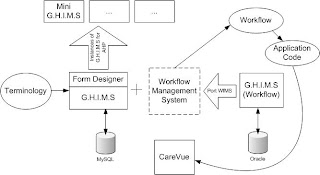


The diagram above depicts the current state of the technology. Essentially, there are two versions of G.H.I.M.S that need to be consolidated. The version of G.H.I.M.S that was developed by Peter Budd contains a form designer with version control using a MySQL database. The second version of G.H.I.M.S, developed by William Chau, contains a workflow management systems (WfMS), written in C#, but does not contain a versioned form designer. The backend operates on an Oracle database.


In order for the system to function, investigation needs to be done to port the WfMS into Perl for it to be compatable with G.H.I.M.S developed by Peter. Open source backend, such as MySQL will also need to be implemented. Using the system and workflow analysis completed in the first half of the thesis, we have to demonstrate the generic generation of an ICU information system. In order to reduce scope, this ICU system will be a component of the ideal system that is complex enough to demonstrate a proof of concept. It is essential that several principals, on which G.H.I.M.S is based upon, are demonstrated. These are (on the top of my head):


  • Support for user workflow - adaptive workflow for the main users of an ICU information system; i.e., clinicians, nurses, allied healthcare professionals, administrators, researchers

  • Use of terminology (SNOMED-CT)

  • Customisation and Interoperability - data transfer between the ICU G.H.I.M.S and a mini (basic) G.H.I.M.S for allied healthcare professionals.

  • Extendability - ability for users to effectively define their own systems (and workflow) with the use of the form designer.

  • Medical Record storage and retreival.

My Tasks for the next week


For the following week, I plan set up the development environment on my laptop, install Peter's code and experiment with G.H.I.M.S. (I have scheduled a meeting with Peter Budd on Friday). My specific aims is to see what is required in order to make the system (bar the WfMS) to work with CareVue or to be able to mimic CareVue. This requires investigating the paper and electronic document environment surrounding the ICU's workflow and their use with CareVue and possibly, how adaptive their workflow will need to be. I plan to post an entry on adaptive workflows soon as this area is especially useful in the ICU environment.


Draft Treatise Hand In


I have finalised the draft treatised and given a copy to Alan Fekete and Jon Patrick for initial feedback. Over the next two days, I plan to work on the draft treatise extending the system analysis and workflow analysis chapters. I also have to clean up the literature review and continue to add to the literature base as I continue researching.

Sunday, August 26, 2007

Meeting with Alan Fekete 24/08/2007

With Jon Patrick being away for the week, Professor Alan Fekete took over as our thesis supervisor. Hendy and I had a meeting with him on Friday and the agenda for this week was to:
  • Update our progress with Alan Fekete.
  • Overall architecture of the proposed supervisor.
  • Requirements for literature review
  • Discuss the scope of the project

Outcomes of the meeting:

  • Need to determine the overarching architecture in which the prototype will be based on (for example, the number of servers and clients in which the system will run on). We will need to get in contact with the RPA for this information. Also, this type of informaiton will be ueful in updating the SRS for an ideal ICU system.
  • Regarding the literature review, the focus would be on:

. 1. workflow, workflow processing, workflow modelling

. 2. Management Information Systems (M.I.S)

. 3. Issues of current M.I.S

. 4. Intensive Care Information System

I plan to get an initial draft to both Alan Fekete and Jon Patrick by next Wednesday before official hand in on Friday.

Tuesday, August 21, 2007

Workflow Update

The diagram below shows the final draft of the complete work flow of an ICU unit. These diagrams still require some feed back from ICU staff.


Given that my draft thesis is due on the 31st of August (approximately 1 1/2) weeks time, I will be spending majority of the time collating and writing up, at the very least, a outline of my thesis and an initial draft of my literature review. Given that the scope is forever changing, I envisage that the initial draft to be quiet different from the final product.

Saturday, August 18, 2007

Weekly Update 06/08/07 - 17/08/07

Project Update:
It has just been two weeks since my last post. Over the past two weeks, I have been updating TRAC (a sub version repository and a wiki) about all the findings that we have gathered during our site visits at the RPA. From there, Hendy and I have been developing workflow diagrams (which seem to get ever more larger and more complex), data flow diagrams, updating an ICU SRS as well as having weekly meetings with my supervisor; Jon Patrick. Furthermore, we have also been returning to RPA to perform follow up meetings with Angela to review our work and confirm work flow diagrams. We have also begun viewing some source code with G.H.I.M.S, however, I have yet to fully look at or experiment with the code.

Project Time Management:
The system analysis phase of the project is taking longer than expected. This is mainly attributed to follow up meetings with Angela as well as the complexity of work flow diagrams (I will post an example later on) in trying to capture the varied and often chaotic work flow of an intensive care unit. Even simple processes such as discharge can be a hurdle due to the numerous legal requirements, reporting processes as well as actual management of the patient. For example work flow thus far (it is still a work in progress) is shown below:


Furthermore, the SRS for an ideal ICU will come from the interviews from RPA personnel as well as a system analysis of CareVue. As a result, we have completed a draft system review of CareVue and from there we are beginning to develop an SRS. We envisage the complete drafted SRS to be finalised by the end of this coming week.

Project Resource Management:
Over the last two weeks, I've had two meetings with Prof. Jon Patrick regarding thesis progress. The first meeting mainly consisted of providing feedback and direction relating to work flow diagrams as well as information in TRAC. The second meeting on 16/08/2007 was to discuss the progress of validating information in TRAC, re-scoping the project and Jon's availability next week. Jon is unavailable next week and will be away for several weeks from the start of September (although he will be able to be contacted via email). To take his place as IT supervisor next week and when Prof. Jon Patrick is away will be Dr Alan Fekete.

I will dedicate a separate post to the re-scoping of the project as it is a significant turning point in the thesis.

Furthermore, we have found out that Angela will be away and consequently unavailable for the next 2 weeks. While this will represents a significant strain in our resources, I see this as an opportunity to fully consolidate our findings before Angela returns. As a result, our contact within RPA for the next two weeks will be Dr. Herkes and Chris.

Task for the following week
Given the significant changes occuring, the tasks for the following week will be to:
  • Consolidate TRAC
  • Complete Work flow Diagram
  • Complete System Review/analysis of CareVue
  • Complete SRS
  • Complete DFDs
  • Review source code for G.H.I.M.S as try to get it working (while setting up develop environment on my home computer and uni computer).
  • Begin to modify G.H.I.M.S if possible.

Resource wise Hendy and I will have to:
  • Contact Dr. Alan Fekete
  • Contact Peter Budd regarding his code

Friday, August 3, 2007

Update: Week Ending 3rd August 2007

Summary of week ending 03/08/07
Hendy and I spent the majority of our time this week (Tuesday to Friday) at the Royal Prince Alfred Hospital. My main goals for the week were to:
  • Describe and document workflow of clinicians with an emphasis on their use of clinicial information systems including CareVue.
  • Map out workflow into simple diagrams.
  • System analysis of CareVue and its ability to satisfy its purpose.
  • Summaries and report any significant issues with current ICU information systems.
  • Elicit functional and non-functional requirements of an idealised ICU information system.
Week commencing 06/08/07
Hendy and I also had a detailed meeting with Jon Patrick to discuss progress and what to do next on Friday. Over the coming week, I hope to achieve the following:
  • Write up system analysis document (Draft) - contain SRS, full analysis of workflow, data flow, interview findings, etc
  • Follow up interviews/meetings with RPA to present and finalise findings.
  • Experiment with G.H.I.M.S (if time permits)
I will follow up these entries with a summary of findings over next few days.

Saturday, July 28, 2007

Project Plan and Tasks for the coming week

On Friday, I handed in my project plan. For an electronic copy click here.

For the following week, Hendy and I have organised to meet with RPA personnelto elicit and uncover workflows in an ICU. Preliminary schedule is as follows:

Tuesday: 8.30am - shadow and interview Doctor
Wednesday: 1.30-4.30 - shadow and interview nurses.
Thursday: TBC
Friday: TBC

Friday, July 27, 2007

ICU General Workflow (Meeting with Angela on 25th and 27th July 2007)

On the 25th and 27th of July 2007, Hendy and I had meetings with Angela Ryan of RPA hospital. Briefly, the core purposes of the meeting were to discuss:
  • The ICU structure at the Royal Prince Alfred Hospital
  • The flow of patient in a general ICU.
  • Brief overview of the “Whiteboard”
  • Core users of RPA ICU’s information system; CareVue
  • Extension of Functional and Non Functional Requirements

ICU Department at RPA

The ICU at the RPA hospital is divided into three/four sub division/department based on the three types of patient that is administered into the ICU. They are:

1.General ICU
– The most generalised ICU unit that is designed to deliver the highest of medical and nursing care to the sickest of patients with non-unique conditions.
General ICU High Dependency Unit (HDU)– deals with patients which need constant care. Often up to two nurses can be assigned to each patient in the High Dependency ICU

2.Cardiothoracic Intensive Care Unit (CICU)/High Dependency Unit (CICU-HDU) - CICU cares for patients who need heart (cardiac) and chest (thoracic) surgery. Surgical procedures may include operations on the heart, the heart’s blood vessels, the chest or the lungs.

3. Coronary Care Unit (CCU) - The Coronary Care Unit or CCU cares for patients who have heart disease and occasionally other medical or surgical problems. In RPA, this unit is more or less combined with CICU.

4. Neurosurgical Intensive Care Unit (NICU)/High Dependency Unit (NICU-HDU) - The Neurosurgical Intensive Care Unit cares for patients with brain or spinal cord conditions and occasionally other medical or surgical problems. (Source)

The General ICU and Neurosurgical ICU/HDU patients are cared by specialist doctors relevant to their area whereas the General ICU HDU and Cariotherastic ICU/HDU care is driven by ICU specific doctors.

Flow of patient in a general ICU

Patients who come into ICU often need constant monitoring and medical care. These are usually patients from lengthy surgery, unconscious and/or require ventilation hookup. A new patient administered into the ICU would follow the procedure:

1. Upon arrival (or even before arrival) a new patient is created in CareVue. Given the MRN, a linkage to the hospital’s patient administration system automatically uploads all other administrative (not medically relevant) data.

2. The patient physically arrives to the ICU department, usually accompanied with several nurses and doctors. During the setup procedure, necessary equipment (such as ventilator, machines measuring vital signs) are attached and linked to the patient. Once linked some of these medical equipment automatically update data into CareVue.

3. Nurses and/or doctors then create a care plan for the patient. (Different depending on diagnosis or investigation).

4. Nurses and doctors perform their duty in caring for the patient (To be investigated next week).

ICU Whiteboard

In almost all hospital departments, exist a whiteboard used to record and keep track of patients, nurses and doctors on shift. The RPA’s ICU uses a whiteboard as a tool to map patients to nurses and to record which doctors are on shift.

Core Users of CareVue
  • Doctors – heavy user
  • Nurses – heavy user
  • Physios – medium user
  • Dieticcian – heavy user
  • Social workers – light users
  • Visiting Medical Teams – medium users
  • Speech Pathologist – medium users
Note: Physios, Dieticians, Speech Pathologists and Pharmacists are usually referred to as Allied Healthcare professionals. These set of users have limited use in CareVue. They often view CareVue information and only enter notes compared to Doctors or Nurses whom extensively use CareVue.